
Self-hosted · your data, your server
One page for your links. A real gate for your files.
Every other link page hands your file to anyone who clicks. Plink asks for an address first — it joins your list, then a single-use link delivers the file. The gate holds even if you forget you set it.
Or look at a real page firstNo public sign-up. Accounts are created by hand, which is also why there is no free tier to downgrade you from.
- Gatedthe lock — an email before the file
- Videoembeds play in place, no leaving the page
- Sectionsheaders to group what you publish
- Capturea signup form, inline on the page
A page built in about five minutes

Anjali Rao
Design systems, in public. Twice a month.
Watch the 12-minute talk
Join 4,200 designers
Prefer a real one? /viinaymehta ↗
No trackers
Not one third-party script on any page you publish.
No lock-in
Export every address, with its source, whenever you want.
No free tier
Nothing to downgrade you from, and nothing to upsell.
The problem
A PDF behind a public URL is a PDF you have given away.
You do the work, you post the link, and the file travels without you. The people who downloaded it are a number in someone else's analytics, and the next thing you make starts from zero again.
The product
Three screens, and you have seen all of it
Every screenshot below is the real dashboard, taken from a seeded demo account. Nothing here is a mockup, and none of it is anybody's actual subscriber list.
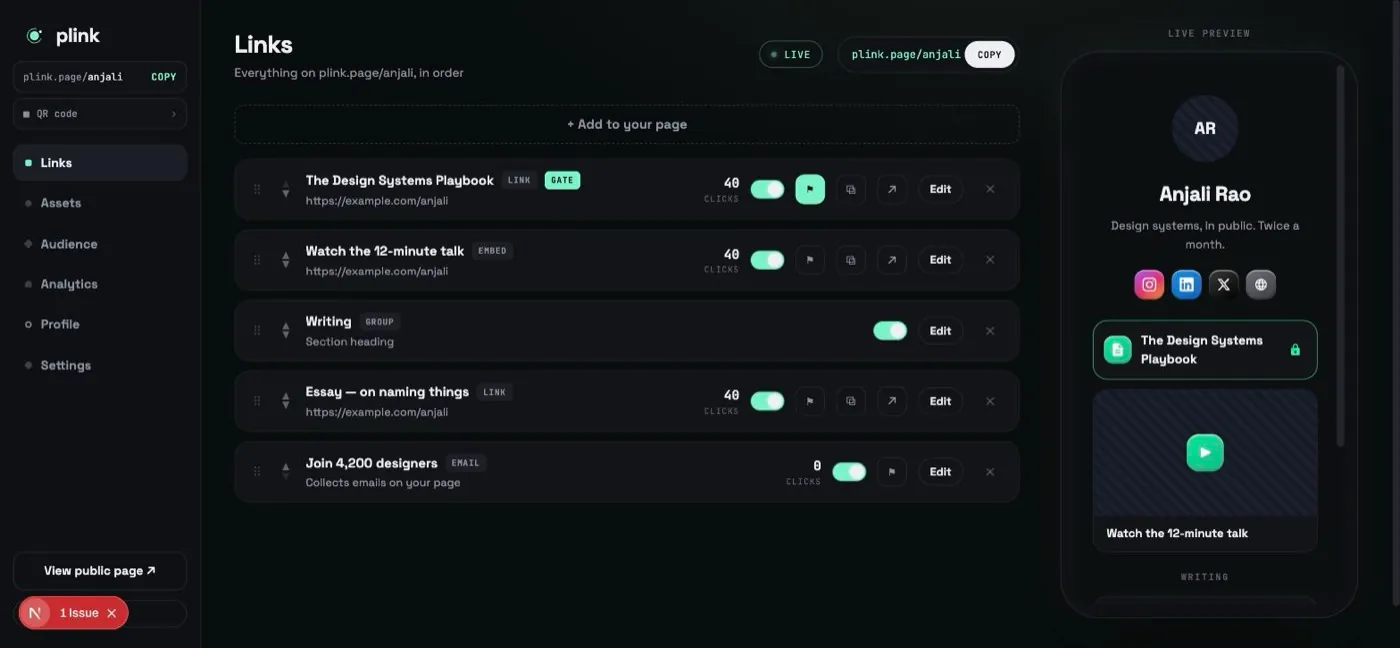
01 — THE GATE
Attach a file, flip one switch
A link becomes gated by turning on “require email before access” and choosing the file. The badge on the row is how you tell at a glance, and the preview on the right is exactly what a visitor sees — lock included.
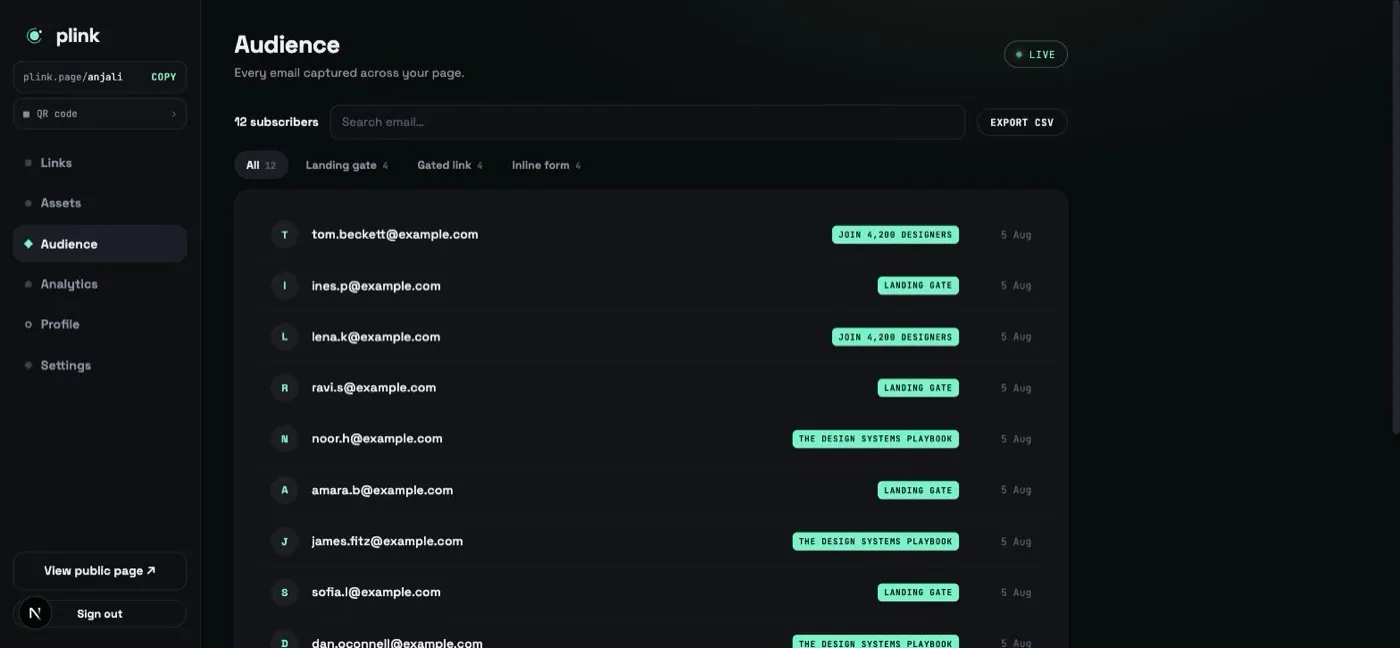
02 — WHO ARRIVED
Every address, and where it came from
Each capture records which link it came through, so “gated link” and “inline form” never blur together. Filter by source, search by address, export the lot as CSV whenever you want it.
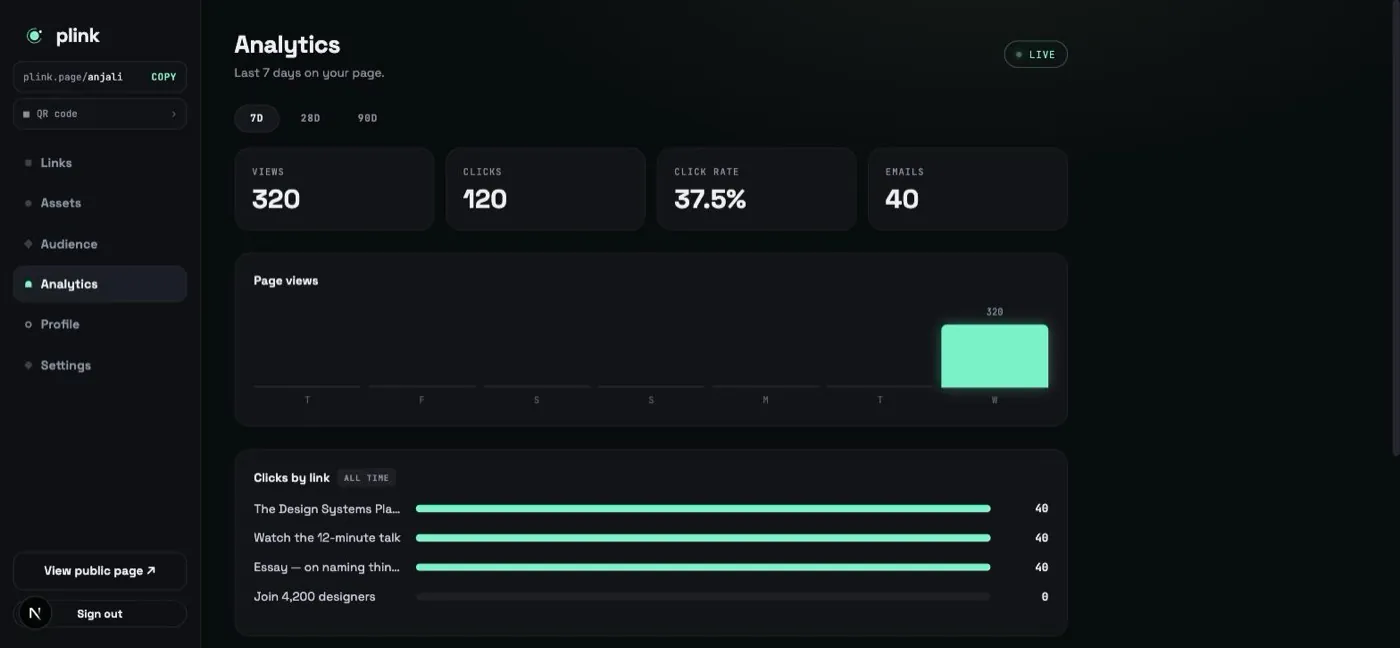
03 — WHAT IT DID
Counted on your own server
Views, clicks, click rate and captures, plus which link earned them. No third-party script is involved, so there is no cookie banner and nothing to disclose.
Built around the download, not the link
Anyone can render a list of buttons. These are the parts that are hard to get right, and the reason this exists.
The gate cannot be bypassed
A gated file is checked at the moment it is requested, not when you set it up. Turning the direct-download switch back on does not quietly reopen it — the gate wins, every time.
Download links expire
Each capture issues its own link, good for 24 hours and then dead. Forwarding it to a group chat buys them a day — the share buttons point at the gate, so the normal way to pass it on still asks for an address.
Renaming a link does not break it
Change a title and the old URL keeps working — it redirects to the new one. Every link you have already shared survives the edit.
Analytics with no third-party scripts
Views, clicks, sources and downloads, counted on your own server. No tracking pixel, no cookie banner, and visitors are a coarse hash that cannot be reversed.
Schedule things to appear and expire
Give a link a go-live date, an expiry, or both. An expired link stops being downloadable, not just hidden from the page.
The audience is yours
Every address, its source and its consent record, exportable as CSV whenever you want it. No plan gates the export.
What happens when someone wants your file
- 01
Taps the link
On your page, or a URL you shared directly. Both land in the same place.
- 02
Leaves an address
One field. It joins your audience with its source recorded.
- 03
Gets a private link
Issued to them, expiring, and good for exactly one download.
- 04
You see it
The capture, the download and where they came from, on your dashboard.
The same link, two outcomes
Nothing here is a knock on other tools — they are built to send people somewhere. This one is built around what happens when they arrive.
| When someone clicks | A normal link page | Plink |
|---|---|---|
| They get the file | Immediately | After leaving an address |
| You get the address | No | Yes, with its source |
| The link is forwarded | Works for everyone, forever | Dies after 24 hours |
| You rename the link | Old URL breaks | Old URL redirects |
| Third-party scripts | Usually several | None |
| Exporting your list | Often a paid plan | CSV, always |
Questions worth asking first
Do I have to host this myself?
Not necessarily — you can ask for an account on this instance and skip all of it. If you would rather run your own, it is a Next.js app and a MongoDB connection string, and the deployment guide is in the repository.
What happens to my list if I stop using it?
You export it. Every address, its source and its consent record, as CSV, with no plan gating the button. Self-hosting means the database is yours regardless.
Can someone just share the download link?
They can, and it will work for whoever opens it inside 24 hours. After that it is dead, and the address it was issued to is already on your list. The share buttons on the download page deliberately point at the gate rather than the file, so the ordinary way of passing it on still asks the next person for their address.
Does it need a mail server?
No, and there is not one. The file is delivered on the page immediately after the address is left, rather than emailed. That is a deliberate trade: fewer moving parts, and nothing sitting in a spam folder.
What exactly is collected about visitors?
A page view, a click, the referring host, and a coarse device class. The visitor identifier is a truncated hash of IP and user agent that cannot be reversed. No cookie is set on a public page.
Can I use my own domain?
On your own instance, yes — point the domain at the server and set one environment variable. On this one, your page lives at a handle under this domain.
Want one of your own?
Tell me who you are and what you would use it for. Accounts are made by hand, so this is a short conversation rather than a form funnel.